Posts

Let's have fun with Google.
Image
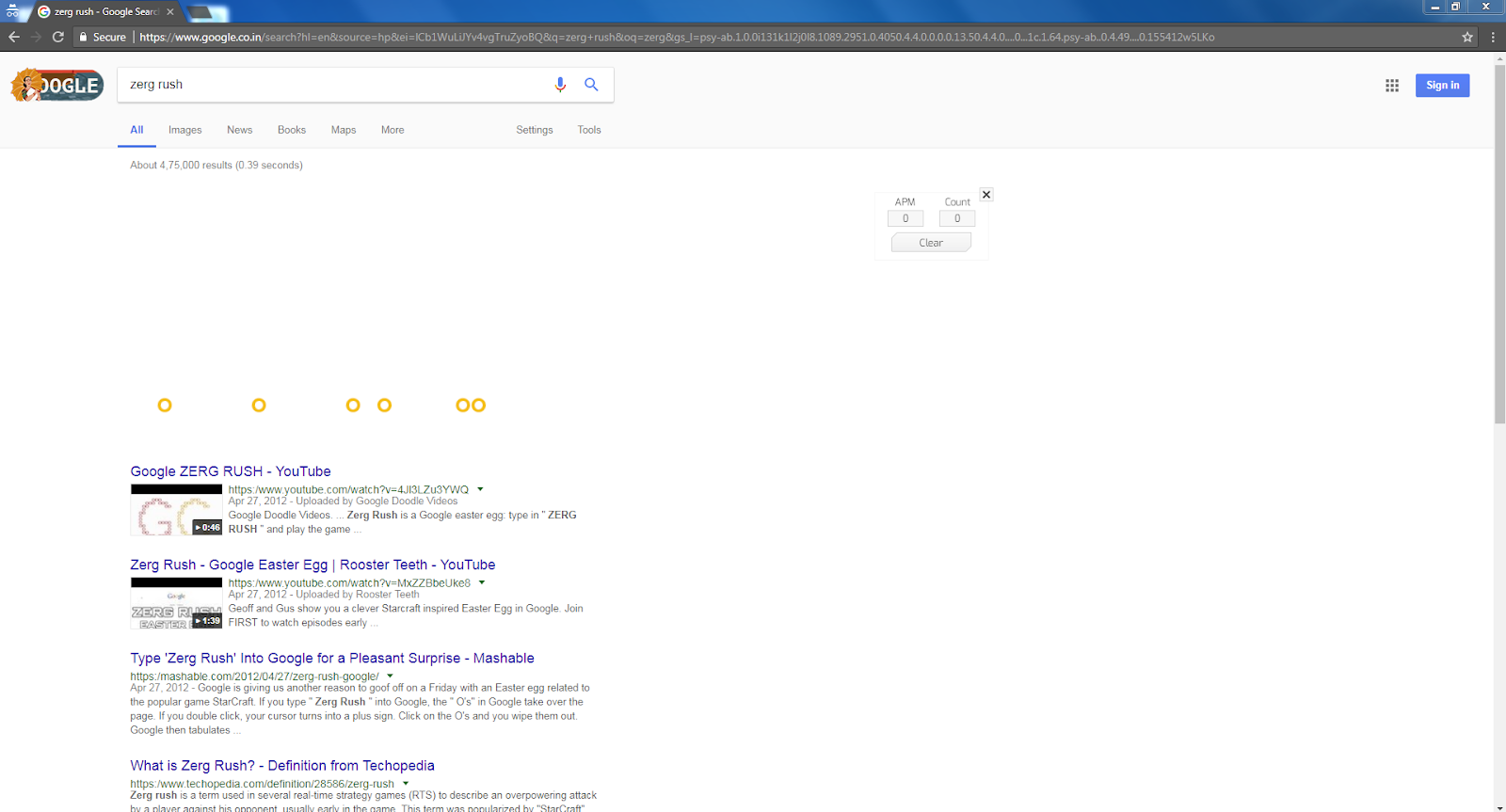
Hi everyone! Today I am going to tell some fun searches you can do in Google. These searches are not useful but good for time pass. So let's get into it. 1. Zerg rush Search for this and you will find your search results are been eaten by some O shaped things and you have to kill them with your mouse. Your score will be shown in upper right side. 2. Recursion     When you search recursion google will ask you do you mean recursion even if the spelling is correct. When you click it , it will reload. That's all. You can do this as many times as you like. 3. anagram When you search anagram google will ask you do you mean "nag a ram". Now that's funny. I really didn't know why google does this. 4. Super Mario bros When you search this you will find a question mark icon in which you can keep on clicking. It is like the Mario game. It also got that sound. 5. Google in 1998 Search this and click on the first link. You can see google...

A phone with 12000 mah battery!!!

Image
Hi everyone! Today I am going to tell about a phone. It is DOOGEE BL12000 Pro. Doogee is a Chinese company which offers well nice phones. But this one is a battery beast. The main feature of this phone is 12000 mah battery. Usually smartphone users carry power bank with them to charge their phones. Looks like now Doogee has come with a good solution. Let's know more about this phone. It has 6 inch full HD+ display with screen resolution of 1080 x 2160 pixels and 18:9 aspect ratio. It runs on android Nougat but is updatable to Oreo. It has got octa core processor. It has got 6 GB of ram and 64/128 GB of internal storage. It has 16 MP selfie camera and 16 MP + 13 MP dual cameras. It has fingerprint scanner, ambient light, proximity sensor, and accelerometer. For smooth running of games it has got  ARM Mali-T880 MP2 GPU. And yes it had got 12000 mah battery. It will surely last for 3 days. This phone is not slim and most of the phones out there. It weighs 300 grams. Yo...

A solution for phone hanging

Image
Hi everyone! Today I am going to tell about a way to stop hanging of your phone. Usually our phone hangs because of a lot of apps installed in our phone which many of use frequently like Amazon, Flipkart, Paytm, etc. But what if you get all these in one single app? Yes it possible. This way you can save a lot of phone storage. So let's get into it. 1. First download an app called online shopping app.  Click here  to install it from play store or  Click here  to download the apk file and install it. 2. Open it. You will see you have a lot of your favourite apps like Myntra, Amazon, Flipkart etc. You also have lot of categories to choose from. You can even recharge jio. All this you get in one app. You can do all your shopping here. You can also enable shortcut notification to get quick access in your notification panel. So that's it. Hope this post was helpful. Share this to your friends who have storage problems. If you are new to this blo...

How to recover deleted photos from android ?

Image
Hi everyone! Today I am going to tell How to recover deleted photos from android ? Well there are many situations where we accidentally delete our important photos and videos. So how to recover them. Well for recovering photos your phone need not be rooted but for videos it should be rooted. Here let's check how to recover deleted photos from a non rooted android device. So let's get into it . 1. Download an app called Disk digger photo recovery.  Click here  to install it from play store or  Click here  to download the apk file and install it. 2. Open the app. If your device is rooted then you can do a full scan otherwise click on start basic photo scan. It will scan all your photos and you can find your deleted photos and recover them. You can select the photos needed and click on recover. You can recover any way you like. I recommend to save it to drive. So that's it. Hope you found this post helpful .Share this to your friends who want their de...

Die with me app review

Image
Hi everyone! Today I am going to tell about an app which was viral called Die with me. Now to use this app your phone's battery should be less than 5%!. Yes less than 5%. Then you shall enter your name and you can chat with other users of this app who have less than 5% battery life. Well this cannot be stated as a use but this is really an interesting app. It is available in play store but you should pay Rs 75. But don't worry. You can  click here  to download the apk file for free. So let's get dieing 😀. 1. When you open you would see something like this. Click on I AGREE. Then type your name and you start chatting. So that's it. I know this app is completely useless. I don't know why the developers made this app. Just for fun I guess. What do you think ? Pls comment. Well in my opinion it's worth a try. Share this to your friends. If you are new to this blog then don't forget to subscribe my blog to get email notifications. Thank you! 

A mind reading game.

Image
Hi everyone! Today I am going to tell about a cool mind reading game. This game will tell you to remember a number and it will display that number. It's magical right. So let's get into it . 1.  Click here  to install it from play store or  Click here  to download the apk file. 2. Open the app. You will see this. Click on surprise me. 2. Then it will ask you think of a number between 1 and 99. And you will be shown 7 cards. Then you should click yes if you see your number in each of the cards otherwise click no. To show you guys here I am thinking of the number 7. So let's see whether he finds the number. Wow he found my number. Now you have the options to play again or learn the secret. Yes you can learn the secret. It's simple . So that's it. Hope you found this post fun. Share this to your friends. And don't forget to subscribe my blog if you are new to this blog. You will get email notifications. Comments are appreciated...

How to lock folders in your phone?

Image
Hi everyone! Today I am going to tell How to lock folders in your phone?      Because of wide usage of smart phones we save private files on our phone. It may be videos from whatsapp or any private photos. So we may use app locker apps to lock our gallery. But with this method so can lock a particular folder in which you can store all your private files. So let's get into it. 1. First download an app called File and Folder locker.  Click here  to install it from play store or  Click here  to download the apk file and install it. 2. Open the app and set a pin and verify it. 2. Give your gmail ID. It can be used for recovery if you ever forget your password. 3. Now you will can see all the folders in your phone. Click on the green lock next to folder which you want to encrypt. You can check your file manager and the folder will not be there. Note : Pls use this app carefully. If you have your folders locked and you uninstall the app , the...